Integration

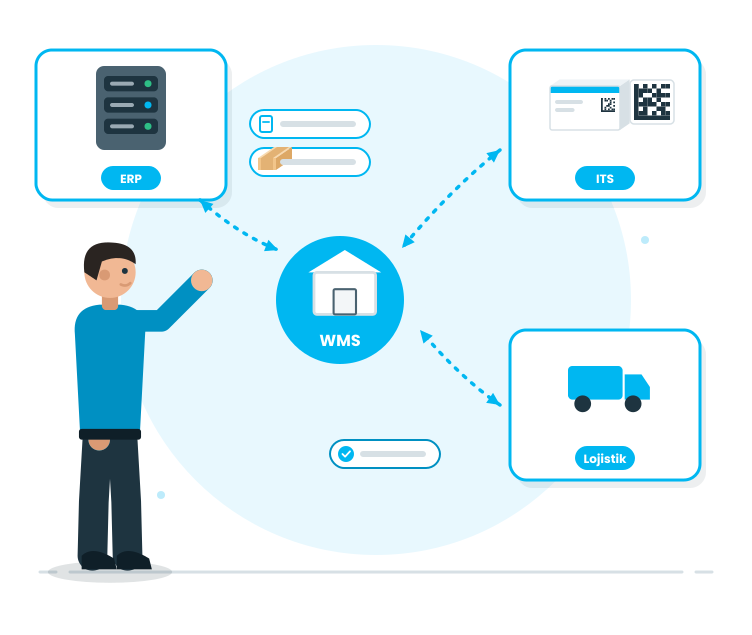
Automates data flow with ERP, ITS, and logistics integrations, reducing double-entry, and streamlining warehouse operations from end to end.

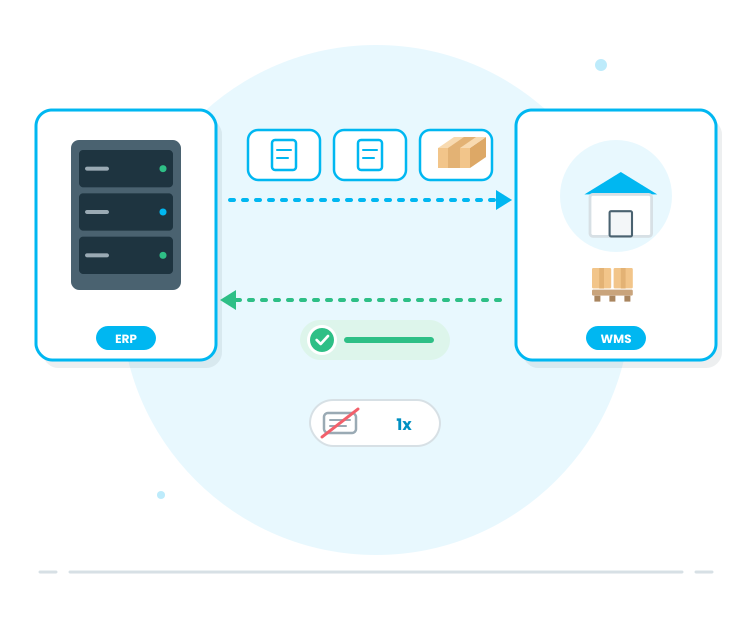
One of the main reasons for the slowdown in warehouse operations is the manual transfer of data. The integration module brings warehouse operations on the WMS platform, in line with the company's ERP infrastructure, ITS platforms, and logistics processes. This eliminates the need for repeated data entry; processes become faster, more reliable, and more traceable.

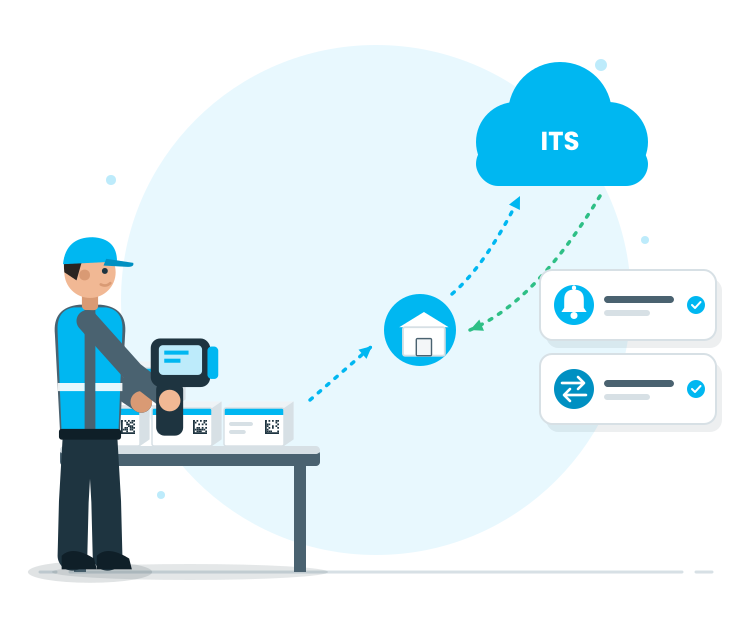
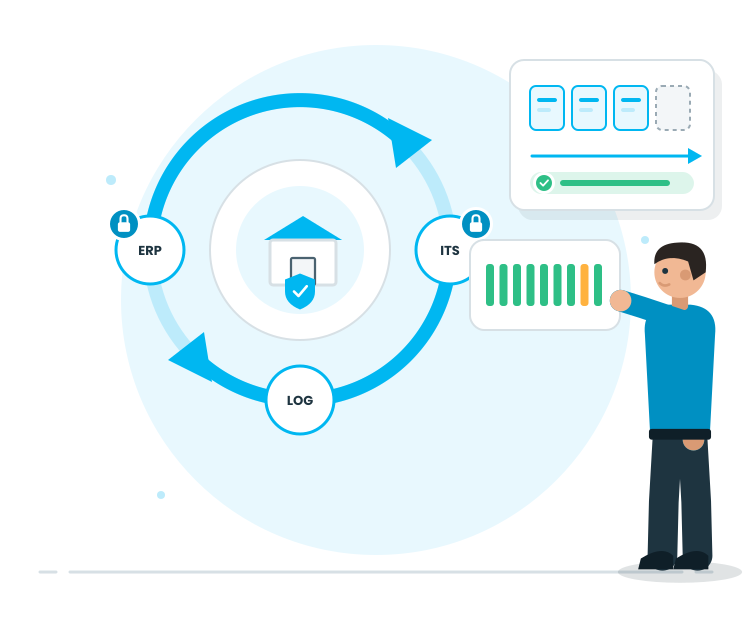
This module is not just about data acquisition; it ensures operational continuity. Incoming orders and movements from the ERP are converted into operations on the WMS, and completed tasks are regularly updated to relevant systems from the WMS. Communication and transfer processes are controlled on the ITS side; logistics operations are simplified with appropriate information flows for transportation/cargo processes.

Request a Demo

Integration
Integration
Integration; managing data flow between the WMS and ERP systems for order/shipment/inventory movements, creating integration requirements with supply chain processes, enabling data exchanges with logistics companies for shipment-related data, ensuring compliance with relevant systems…
Scope of Integration
ERP Entegrasyonu
ITS Entegrasyonu
Monitoring and Error Management
Continuity and Security
Scope of Integration

Inventory Planning Creation

This is the starting point of inventory. The type of inventory (planned/unplanned) is determined, the inventory log is opened, and the inventory operation is initiated under control.

Features

  •  Creating Planned Inventory
  •  Creating Unplanned Inventory (Real-time Control)
  •  Setting the inventory date/time
  •  Adding the inventory purpose/explanation
  •  Safe start with draft status
  •  Quick access via a list

Creating Planned Inventory
Opening the inventory plan with regular cycles to maintain stock accuracy; teams are prepared beforehand.

Creating Unplanned Inventory (Real-time Control)
Instant inventory is initiated for suspicious stock, critical locations, or rapid control needs; the process does not halt.

Setting the inventory date/time
Timed according to the shift plan; the inventory process does not get disrupted.

Adding the inventory purpose/explanation
Recording purposes such as ‘control’, ‘pre-inspection’, and ‘difference verification’; reporting becomes clearer.

Safe start with draft status
Opening the inventory log; the scope becomes clear as it progresses.

Quick access via a list
All items are tracked in a single list; it is visible which inventory is at which stage.

ERP Entegrasyonu

Scope and Task Assignment

This is the stage where we determine where and how the inventory will be performed. Pallet-based or location-based inventory, which product group, which team... all these are clarified here.

Features

  •  Selecting the inventory method (pallet/location)
  •  Defining the scope of the inventory (warehouse/location/cell)
  •  Narrowing the scope with product/material filters
  •  Targeting with criteria such as lot/SKT
  •  Assigning the inventory team/user
  •  Creating a task-based worklist
  •  Locking the scope for discipline

Selecting the inventory method (pallet/location)
Choosing quick control with pallet-based and detailed verification with location-based inventory; the process progresses according to the need.

Defining the scope of the inventory (warehouse/location/cell)
Inventory is performed only on the target area; the depot does not slow down the general inventory.

Narrowing the scope with product/material filters
Prioritizing specific product groups or critical stock; the inventory becomes more efficient.

Targeting with criteria such as lot/SKT
Riskier or critical stock is controlled more accurately; the quality discipline strengthens.

Assigning the inventory team/user
Who will do the inventory is clear; the uncertainty 'who will do it?' on-site is eliminated.

Creating a task-based worklist
The task is assigned to the operator's screen; the process runs on-site genuinely.

Locking the scope for discipline
Preventing the scope from changing without control after inventory starts; the results become reliable.

ITS Entegrasyonu

Inventory with Barcode Scanning

This is the stage where the inventory takes place. In pallet-based inventory, the pallet label is scanned; in location-based inventory, the location is scanned first, followed by the contents. The system shows the ‘scanned–expected’ difference in real-time.

Features

  •  Shipment Management by Pallets
  •  Location-based Shipment Management (Location scan → Content scan)
  •  Quick Shipment Management via Barcode/Label Scanning
  •  Manual Entry (Controlled)
  •  Not being able to continue from the last location
  •  Missing/Double Scans Warning
  •  Shipment Progress Indicator (Completed/Remaining)

Shipment Management by Pallets
Pallet scanning and content verification are quick; the shipment duration is significantly reduced in wide areas.

Location-based Shipment Management (Location scan → Content scan)
Location verification is done, followed by content counting; location and stock verification are performed concurrently.

Quick Shipment Management via Barcode/Label Scanning
Shipment 'write-off' occurs; scanning reduces error risk and increases speed.

Manual Entry (Controlled)
Manual registration is possible under mandatory conditions; however, the process progresses in a disciplined manner.

Not being able to continue from the last location
Shipment halts do not result in registration loss; the team continues from the location where they left off.

Missing/Double Scans Warning
Incorrect scans are caught in real-time; the need for 'correction later' diminishes.

Shipment Progress Indicator (Completed/Remaining)
The warehouse team can see where the shipment is; planning and speed management become easier.

Monitoring and Error Management

Analysis and Approval

At the end of the shipment, the actual value emerges as the details of the discrepancies become clear. This stage makes visible the discrepancies, facilitates justifications and approval discipline.

Features

  •  Automated calculation of shipment discrepancies
  •  Enhanced visibility of discrepancies
  •  Adding explanations for discrepancies
  •  Re-shipping request (when needed)
  •  Approval process for authorized personnel
  •  Alert logic for critical discrepancies

Automated calculation of shipment discrepancies
System instantly identifies the difference between the shipment result and the recorded stock; the team can make quick decisions.

Enhanced visibility of discrepancies
Discrepancies do not interfere; the location of the missing product is clearly visible.

Adding explanations for discrepancies
Operational reality is recorded; reports become meaningful.

Re-shipping request (when needed)
Uncertain records are re-verified; the risk of incorrect corrections decreases.

Approval process for authorized personnel
Stock correction is not performed without control; it progresses with a secure approval step.

Alert logic for critical discrepancies
System alerts when specific thresholds are crossed; loss or risk is quickly addressed.

Continuity and Security

Stock Updates and Reporting

Stock updates are made based on approved shipment results, and the process concludes. This stage ensures the shipment's lasting benefits: reports, KPIs, and traceability.

Features

  •  Stock correction after approval (controlled)
  •  Stock movement tracking for traceability
  •  Marking the shipment as completed
  •  Shipment discrepancy report
  •  Location/pallet-based shipment reports
  •  Export to Excel
  •  Key Performance Indicators (Stock accuracy, discrepancy ratio, shipment performance)

Stock correction after approval (controlled)
Approved discrepancies are reflected in the stock; the records are updated and become reliable.

Stock movement tracking for traceability
The timing, person, and reason for the correction are clear.

Marking the shipment as completed
The process concludes; pending shipments are removed, operations become smoother.

Shipment discrepancy report
Discrepancies are reported by product; improvement areas become visible.

Location/pallet-based shipment reports
Which location/pallet has more discrepancies is clear; the warehouse organization is strengthened.

Export to Excel
Quickly obtain the required outputs; sharing and analysis become easier.

Key Performance Indicators (Stock accuracy, discrepancy ratio, shipment performance)
The impact of the shipment is measured; the warehouse management becomes more predictable.